Direct answer
Create Custom Adjustments from Create & Share, choose Offense or Defense, select the options for a package, save it, and give it a recognizable name. You may create up to 20 offensive and 20 defensive adjustments, select 10 active adjustments for a game, and apply them from the play-call screen or at the line of scrimmage.
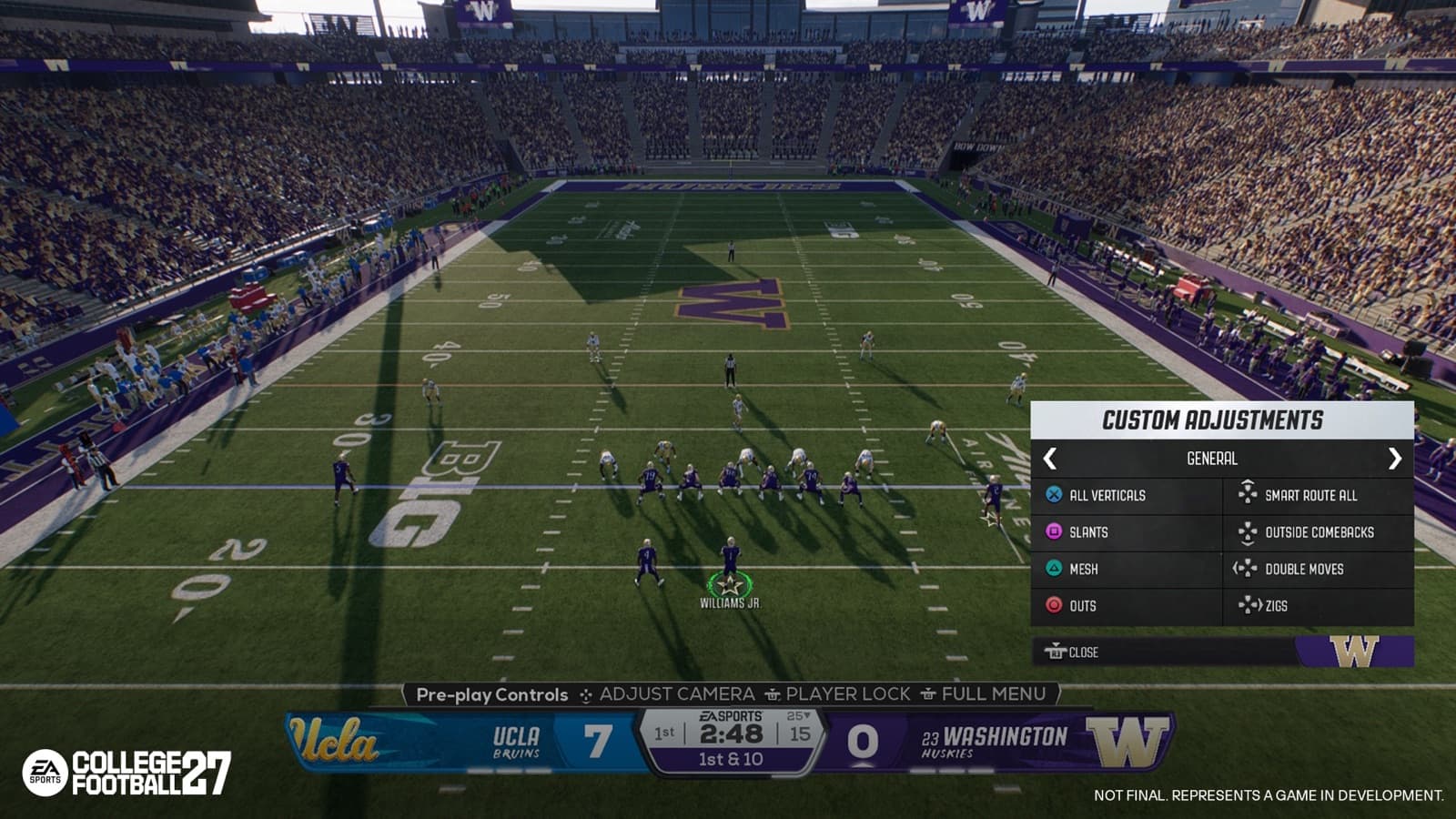
Official College Football 27 Custom Adjustments capture showing a saved pre-play menu. Official pre-release development capture; the live interface may differ.
What Custom Adjustments are built to solve
Custom Adjustments, also called macros by EA, let you pre-save multiple offensive or defensive changes as a named package. Supported ingredients include fronts, leverage, coverage behavior, pass protection, pressure looks, route concepts, hot routes, and individual assignments. Instead of rebuilding a familiar answer through many separate pre-snap menus, you call the saved package when the situation appears.
The feature sits inside College Football 27's broader pre-play control redesign. EA describes faster hubs for coverage alignment, leverage, pass commitments, Smart Zone behavior, receiver focus, and double teams. Custom packages do not remove the need to identify formation, personnel, down, distance, and field position. They shorten the path between recognizing a problem and presenting the response you prepared.
- Offensive packages can combine protection, routes, concepts, and assignments.
- Defensive packages can combine fronts, leverage, coverage, pressure, and assignments.
- Saved packages reduce repeated menu navigation.
- The user still decides when the prepared answer fits the live look.
Create, save, and name a package
From the main menu, open Create & Share, choose Custom Adjustments, and select Offense or Defense. Choose Create Adjustment, move through the available options, tick the pieces you want, save the package, enter a name, and finish with Done. EA specifically recommends a name you will recognize during a match. Preset adjustments are also available immediately if you are not ready to build a custom package.
You can create up to 20 packages on offense and 20 on defense. That is the library, not the match-day menu: only 10 active adjustments can be brought into a game. The distinction encourages preparation. You can keep specialty answers in the larger library, then activate the subset that matches your expected opponent or the style you want to practice.
- Open Create & Share from the main menu.
- Choose Custom Adjustments, then Offense or Defense.
- Select Create Adjustment and tick the desired options.
- Save the package, give it a match-readable name, and choose Done.
- Select no more than 10 active packages for the game plan.
Build a balanced ten-package game plan
EA includes defensive presets such as QB Scramble, Play Short Routes, No Deep Passes, and Defend Screen Pass. Offensive presets include Go Vertical, Slants, Mesh, Outs, Smart Routes, Comebacks, Double Moves, and Zigs. These are useful starting points because they demonstrate the feature without requiring an immediate custom build. They are not guarantees against a coverage or pressure; the opponent's call and your execution still determine the result.
Avoid filling every slot with variations of the same idea. Ten deep-pass packages leave no fast answer to screens; ten quick-game packages make it harder to change the stress point. The active set should cover different problems while remaining small enough to recall. If you cannot explain in one sentence when to use a package, rename it, simplify it, or leave it in the 20-package library until it has a clear role.
- Include answers for both aggressive and conservative situations.
- Keep package names short and distinct on the match interface.
- Use presets to learn the workflow before expanding custom systems.
- Rotate the active ten when the opponent or practice objective changes.
Apply adjustments at the play-call screen and line
Custom Adjustments can be accessed from the play-call screen and from the line of scrimmage. At the line, EA Help lists L1 on PlayStation, LB on Xbox, and Left Alt on keyboard as the access input, followed by the right stick or arrow keys to select a package. Controls can be displayed contextually, so follow the current on-screen prompt for the platform and control scheme you are using.
At the play-call screen, choose the play and use the displayed control to open the adjustment choices associated with it. EA's gameplay deep dive describes the saved packages appearing above stunt and twist options. At the line, selecting the corresponding package applies the prepared setup quickly. The advantage is speed, but only if you already know what the package does; opening a macro is not a substitute for reading the defense or offense.
Recommendation: prefer the play-call screen while learning because it gives you more time to confirm the package and base play together. Move more of the process to the line only after the names and results are familiar. This is practice advice, not a claim that one interface is competitively superior. The correct location depends on how late the opponent reveals the look you are answering.
Respect the set rule and home-field behavior
After an adjustment is applied, players must get set at the line before you can apply another one. College Football 27 does not allow endless stacking while players are still moving through pre-play changes. Build your sequence with that pause in mind. If one package already contains the complete response, avoid adding unnecessary motion or extra changes that consume time without a clear purpose.
Custom Adjustments are not affected by home-field advantage. EA compares the idea to using a prepared hand signal in a hostile environment: the package remains available even when the crowd is a factor. That does not make the rest of the play immune to pressure or remove the need to execute; it only describes the macro system's behavior.
Recommendation: practice one adjustment, wait for the set, then snap before rehearsing multi-step sequences. Once that rhythm is automatic, test whether a second change is genuinely needed. This is suggested training discipline. The official rule is the required set between adjustments; how many packages you attempt before a snap should follow the clock, the look, and your comfort level.
- Apply a package only after identifying the problem it addresses.
- Wait for every player to get set before another adjustment.
- Do not confuse macro availability with guaranteed play success.
- Use the same timing routine at home and on the road.
Practice, diagnose, and refine your library
Test each package against a small set of recognizable looks. For an offensive protection or route package, observe whether the line and eligible receivers actually move into the expected assignments. For a defensive package, check the front, leverage, depth, and post-snap responsibility. Change only one package component between tests so the cause of a different result remains visible.
Recommendation: keep a brief three-column note for situation, package, and result. Record whether the macro applied correctly, whether the base play supported it, and what the opponent could exploit. This is outside-the-game study advice, not an official feature. After several tests, promote the reliable answers into the active ten and leave experimental or opponent-specific packages in the larger library.
Review the active list whenever your playbook or preferred scheme changes. A macro built around one formation can be less useful when the base calls, personnel, or strategic goal changes. Start from presets again if a title update alters controls or behavior, then rebuild only what you can verify in the current game. A focused, tested library is more valuable than 40 packages you cannot identify under pressure.
- Test one package against a known look.
- Confirm every assignment before judging the result of the play.
- Rename or simplify any package that is hard to recall.
- Select the ten reliable answers that fit the next game plan.