Direct answer
Road to the College Football Playoff is College Football 27's competitive online head-to-head season mode. Choose from all 138 teams, earn ranking points, and finish inside the Top 12 to enter the Playoff. Seven divisions run from Recruit through Heisman, while five team tiers and road wins influence point opportunities. Complete objectives for rewards, save a mode-specific depth chart, and use Reset Schedule when the season outcome is already decided.
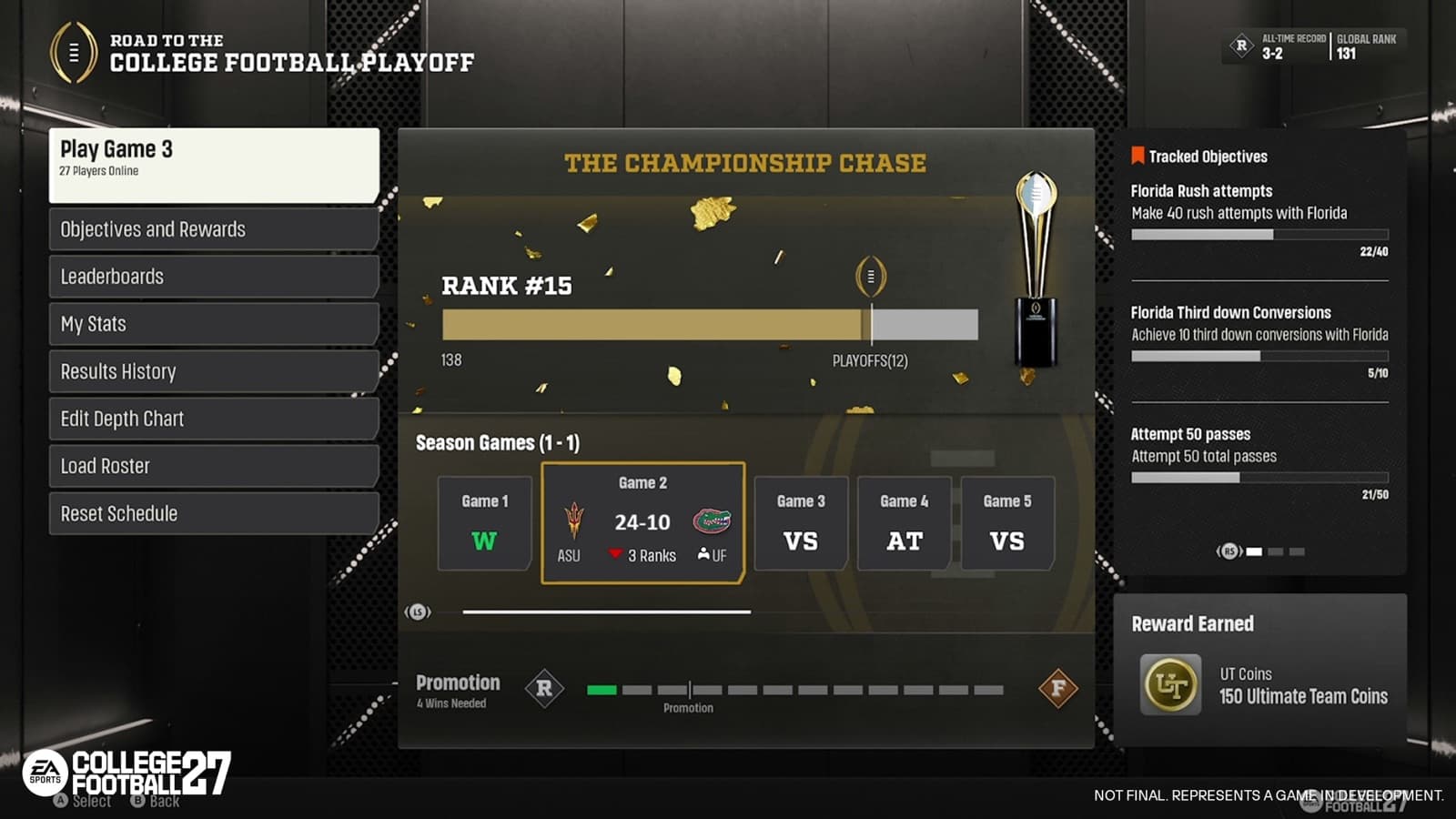
Official Road to the College Football Playoff hub capture; rankings, objectives, results, and rewards shown are sample data. Official pre-release development capture; the live interface may differ.
Understand the competitive online season
Road to the College Football Playoff, often shortened by players to Road to CFP, is the competitive online head-to-head mode built around reaching the Playoff and winning the National Championship. A season is more than a string of disconnected matchups: wins and losses shape the ranking chase and the end-of-season division result. The official structure keeps the immediate objective visible from the first game—build a strong enough season to reach the Top 12, then survive the postseason.
Reaching the Playoff does not award the title automatically. EA's deep dive says a player must win two Playoff games before earning a place in the National Championship. Completing that championship run awards a Trophy Room item. Treat each regular-season game as part of a resume, but do not invent an unofficial required record because the published explanation does not give one universal win total for every division and ranking context. Read the current standings after every result.
Climb seven divisions without guessing the threshold
Road to CFP has seven divisions, beginning at Recruit and ending at Heisman. At the end of a season, performance determines whether you move up, remain in the same division, or move down. The ladder rewards sustained results rather than treating one notable upset as a complete season. Higher divisions should bring stronger competition, but EA does not publish a fixed opponent profile or a guaranteed promotion record in the source used here.
Use the division screen as the current source of truth for your position and remaining path. Our recommendation is to review the standing before queueing when the season approaches a decision point. That keeps the match objective clear: protect the current division, secure promotion, or continue the Top 12 chase. Do not confuse division with team tier. Division describes your competitive progression; tier classifies the program selected for a matchup and helps shape ranking-point value.
Choose among 138 teams and five tiers
All 138 teams are available in Road to CFP and are arranged into five competitive tiers. Tier 1 contains the strongest programs in the mode, with the remaining teams grouped through Tier 5. The system is intended to support more than a single powerhouse-only path. You can choose a favorite program, a familiar scheme, or a lower-tier challenge, but each choice changes the matchup context in which ranking points are awarded.
A lower-tier victory over a higher-tier opponent earns more ranking points than a result without that tier disadvantage. That creates upside for accepting a harder matchup, not a guarantee that the lower-tier team is the fastest route for every player. Our advice is to value familiarity before theoretical point efficiency in the first season. Learn the roster, core formations, and substitution needs of one team; experiment with a different tier only when you can explain what advantage or objective the change serves.
Read ranking points and the Top 12 together
Ranking points build the route into the Top 12. EA confirms that the relative tiers of the two teams matter and that road victories award more ranking points. A win with a lower-tier program over a stronger-tier opponent can therefore carry additional value, and doing it away from home adds another meaningful factor. The official article does not expose a complete point equation, so this guide does not publish a calculator or promise a precise gain before the result screen appears.
Use the points shown after the game to evaluate the actual tradeoff. A high-upside matchup that produces repeated losses may be less useful than a team you can execute with consistently. Conversely, always selecting the strongest available program can leave underdog and team-specific objectives untouched. The practical aim is a repeatable plan that produces wins while creating point opportunities you can handle. Recheck the Top 12 position after each game instead of judging the season from division name alone.
Use objectives and rewards as a second progression track
College Football 27 adds more than 4,000 Road to CFP objectives across gameplay, mode milestones, teams, and conferences. Some can complete during ordinary season play, while others encourage a particular program, conference, scheme, or style. They sit alongside the win-loss chase rather than replacing it. Before queueing, inspect the current objective board and choose one compatible goal; forcing several unrelated conditions into the same competitive game can make the primary job of winning harder.
Confirmed rewards include playbooks and uniform sets as well as Ultimate Team packs and Coins. Availability and requirements belong to the live objective screen, so verify them before planning a session. A reward can justify testing another team or conference, but it does not make that team objectively best for ranking. Our recommendation is to classify objectives as natural, planned, or later: collect natural progress, target one planned objective, and postpone anything that conflicts with the current season position.
Save a mode-specific depth chart before queueing
Road to CFP supports depth charts that can be edited and saved specifically for the mode before entering a game. That lets a preferred running back, slot option, specialist, or defensive package begin in the intended place without repeating the same preparation before every matchup. The feature is separate from a universal claim that the highest Overall player should start. Eligibility, role, and the concepts you call still determine whether a change fits the game plan.
Prepare the chart before joining the matchmaking flow. Review starters, backups, specialists, and any position where a package depends on a particular player. Save, leave the screen, and reopen it once to confirm the state. If you switch programs to pursue an objective, inspect that team's chart rather than assuming preferences carry across every roster. EA also provides lifetime statistics and breakdowns for the last five seasons, which can help you compare whether a personnel or team change improved recent results.
Follow a first-season checklist and reset only when decided
Reset Schedule is an option for a season whose outcome is already known. If the mode has established that you will be promoted, stay in place, or be demoted, resetting avoids extra games that no longer change that outcome and moves you toward the next meaningful season. It is not a published calendar reset, a way to erase a live uncertain result, or a substitute for completing a viable Top 12 chase. Use the status shown by the mode before selecting it.
For a first season, keep the plan compact. Choose one familiar team and save its depth chart. Note its tier, your starting division, and one compatible objective. After each game, record the result, road or home setting, point change, and Top 12 movement. Review the objective board without letting it override a must-win situation. At the season decision point, continue if games still affect the Playoff or division result; use Reset Schedule only when the interface confirms the outcome is settled.
- Choose one team, confirm its tier, and save the mode-specific depth chart.
- Select one objective that does not undermine the game plan.
- Track ranking points, Top 12 position, and home or road context after each result.
- Review promotion, survival, or demotion status near the season end.
- Reset the remaining schedule only when those games cannot change the shown outcome.